
Imagine you are building a “URL preview” feature — the kind that fetches a link and shows a thumbnail, like Slack or Twitter does (or e.g. a free screenshot service). You shipped it on a Friday. By Monday, an attacker had used it to quietly pull the AWS credentials off the server’s metadata endpoint. The entire cloud account was compromised. No malware. No exploit kit. Just one unvalidated URL parameter. 🔥
That incident is one of the clearest examples of Server Side Request Forgery (SSRF) you can think of, and it’s exactly why this vulnerability is now listed in the OWASP Top 10 as its own dedicated category. If you’re building anything that fetches URLs, talks to APIs, or reads remote content on behalf of a user, you need to understand SSRF before you ship.
What Is Server Side Request Forgery?
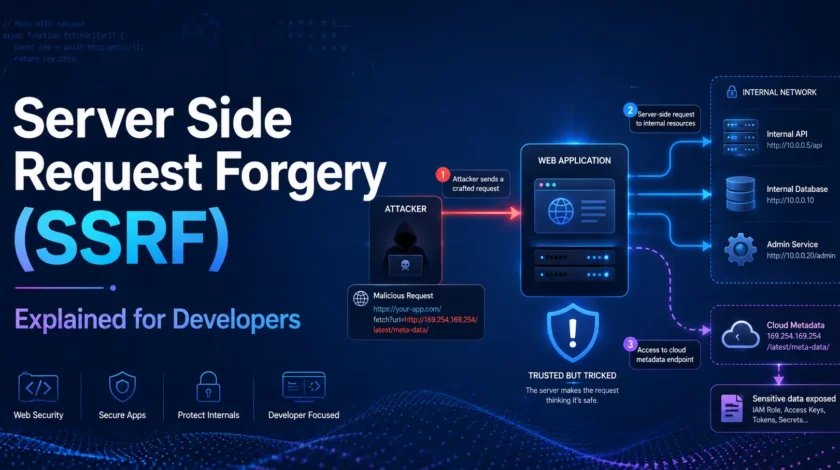
Server Side Request Forgery (SSRF) is a web security vulnerability where an attacker tricks a server into making HTTP requests to an unintended location — often an internal service or cloud metadata endpoint — by supplying a malicious URL as input.
That’s the short answer. Now let’s unpack what that actually means in practice.
When your application fetches a remote URL on behalf of a user (think: “paste a link and we’ll import it”), your server is the one making that HTTP request. The request originates from inside your infrastructure, which means it can reach internal services, private IP ranges, and cloud provider metadata APIs that are completely inaccessible from the public internet.
The attacker doesn’t break in — they redirect your own server to do the fetching for them.
Normal flow:
  User → [App Server] → api.example.com  (intended)

SSRF flow:
  User (attacker) → [App Server] → 169.254.169.254   (AWS metadata — NOT intended)
                                 → http://localhost:6379  (internal Redis)
                                 → http://192.168.1.1    (internal admin panel)Code language: JavaScript (javascript)
Why Should Developers Care About SSRF?
SSRF isn’t just a theoretical CTF puzzle. It shows up in real production systems more often than you’d think, and the consequences range from embarrassing to catastrophic.
1. Cloud Environments Make SSRF Extremely High-Risk
Every major cloud provider — AWS, GCP, Azure — exposes a link-local metadata endpoint at 169.254.169.254. This endpoint responds to any request originating from within the instance. It hands out IAM credentials, SSH keys, instance configuration, and more — with zero authentication required.
An SSRF vulnerability in a cloud-hosted app means an attacker can hit:
http://169.254.169.254/latest/meta-data/iam/security-credentials/Code language: JavaScript (javascript)…and get back temporary AWS access keys. Game over. This exact attack vector was central to the 2019 Capital One breach — a misconfigured WAF with an SSRF flaw led to 100 million customer records being exposed.
2. SSRF Bypasses Your Firewall Entirely
Your firewall probably blocks external traffic to internal services. But SSRF doesn’t come from outside — the request comes from your own server. Internal services like Redis, Elasticsearch, Kubernetes API servers, and admin dashboards that assume “internal = trusted” are all suddenly exposed.
3. SSRF Enables Lateral Movement and Data Exfiltration
Once an attacker can make your server issue arbitrary requests, they can:
- Port-scan your internal network by observing timing differences and error messages
- Exfiltrate secrets from environment variables via metadata endpoints
- Pivot to other internal services using the compromised server as a proxy
- Bypass IP-allow-lists on admin interfaces that trust server-originated traffic
Reflective question: Does your application fetch any URL that a user provides — even partially? If the answer is yes, keep reading.
Example Vulnerability and Protection Mechanisms
Let’s build a realistic “URL content fetcher” — a feature you’d find in any link-preview, webhook tester, or RSS reader — and see exactly how it goes wrong, then fix it properly.
The Vulnerable Version
# vulnerable_fetcher.py
# ⚠️  DO NOT USE IN PRODUCTION — this is intentionally broken for learning purposes

import requests
from flask import Flask, request, jsonify

app = Flask(__name__)

@app.route("/fetch", methods=["GET"])
def fetch_url():
    # 🚨 CRITICAL: The user controls `url` completely — no validation at all.
    url = request.args.get("url")

    if not url:
        return jsonify({"error": "url parameter required"}), 400

    # 🚨 CRITICAL: requests.get() will happily fetch:
    #   - http://169.254.169.254/latest/meta-data/   (AWS metadata)
    #   - http://localhost:6379/                      (local Redis)
    #   - http://192.168.1.1/admin                   (internal router)
    #   - file:///etc/passwd                          (local files, in some libs)
    response = requests.get(url, timeout=5)

    return jsonify({
        "status": response.status_code,
        "body": response.text[:500]  # Still leaks data even with truncation
    })

if __name__ == "__main__":
app.run(debug=True)An attacker hits this with:
# Steal AWS credentials in one request
curl "http://your-app.com/fetch?url=http://169.254.169.254/latest/meta-data/iam/security-credentials/MyRole"

# Probe internal services
curl "http://your-app.com/fetch?url=http://localhost:6379/"

# Read local files (if the HTTP library supports file:// — some do)
curl "http://your-app.com/fetch?url=file:///etc/passwd"The Fixed Version — Defense in Depth
Fixing SSRF requires multiple layers. One check isn’t enough.
# safe_fetcher.py
# ✅ Production-ready SSRF-protected URL fetcher

import ipaddress
import socket
import requests
from urllib.parse import urlparse
from flask import Flask, request, jsonify

app = Flask(__name__)

# ---------------------------------------------------------------------------
# Layer 1: Define an explicit allowlist of permitted schemes and hostnames.
# Always prefer allowlisting over denylisting — blocklists are bypassable.
# ---------------------------------------------------------------------------
ALLOWED_SCHEMES = {"https"}            # Force HTTPS only; reject http, file, ftp, gopher, etc.
ALLOWED_HOSTS   = {
    "api.example.com",
    "cdn.example.com",
    "partner-webhooks.trusted.com",
}

# ---------------------------------------------------------------------------
# Layer 2: Private/reserved IP ranges that must NEVER be reached.
# This is your backstop if an allowed hostname resolves to an internal IP
# (DNS rebinding attack) or if the allowlist is accidentally too broad.
# ---------------------------------------------------------------------------
PRIVATE_RANGES = [
    ipaddress.ip_network("10.0.0.0/8"),
    ipaddress.ip_network("172.16.0.0/12"),
    ipaddress.ip_network("192.168.0.0/16"),
    ipaddress.ip_network("127.0.0.0/8"),        # Loopback
    ipaddress.ip_network("169.254.0.0/16"),     # Link-local (AWS metadata lives here!)
    ipaddress.ip_network("::1/128"),            # IPv6 loopback
    ipaddress.ip_network("fc00::/7"),           # IPv6 unique local
]

def is_private_ip(hostname: str) -> bool:
    """
    Resolve the hostname to its IP and check whether it falls in a private range.
    This catches attacks like:
      - Directly supplying 169.254.169.254 as the host
      - Using a DNS name that resolves to an internal IP (DNS rebinding)
    """
    try:
        # getaddrinfo returns all addresses — check every one of them.
        resolved = socket.getaddrinfo(hostname, None)
        for result in resolved:
            ip = ipaddress.ip_address(result[4][0])
            if any(ip in network for network in PRIVATE_RANGES):
                return True
        return False
    except (socket.gaierror, ValueError):
        # If we can't resolve it, deny it — fail closed, not open.
        return True


def validate_url(url: str) -> tuple[bool, str]:
    """
    Validate a user-supplied URL against our allowlist and IP blocklist.
    Returns (is_valid: bool, reason: str).
    """
    try:
        parsed = urlparse(url)
    except Exception:
        return False, "Malformed URL"

    # Check 1: Scheme must be in allowlist (rejects file://, gopher://, etc.)
    if parsed.scheme not in ALLOWED_SCHEMES:
        return False, f"Scheme '{parsed.scheme}' is not permitted"

    # Check 2: Hostname must be in allowlist
    hostname = parsed.hostname
    if not hostname or hostname not in ALLOWED_HOSTS:
        return False, f"Host '{hostname}' is not on the allowlist"

    # Check 3: Resolve to IP and block private ranges (catches DNS rebinding)
    if is_private_ip(hostname):
        return False, f"Host '{hostname}' resolves to a private/reserved IP address"

    return True, "OK"


@app.route("/fetch", methods=["GET"])
def fetch_url():
    url = request.args.get("url", "").strip()

    if not url:
        return jsonify({"error": "url parameter required"}), 400

    # Run all validation layers before making any network request.
    is_valid, reason = validate_url(url)
    if not is_valid:
        # Log the rejected attempt for your security team — don't expose `reason` to the user.
        app.logger.warning("SSRF attempt blocked: %s | url=%s", reason, url)
        return jsonify({"error": "URL not allowed"}), 403

    try:
        response = requests.get(
            url,
            timeout=5,
            # Layer 4: Disable redirects entirely, or re-validate the redirect target.
            # Attackers use open redirects on allowed hosts to pivot to internal IPs.
            allow_redirects=False,
            # Layer 5: Use a custom User-Agent so you can identify your fetcher in logs.
            headers={"User-Agent": "MyApp-Fetcher/1.0"},
        )
    except requests.RequestException as exc:
        app.logger.error("Fetch failed: %s", exc)
        return jsonify({"error": "Could not retrieve URL"}), 502

    # Layer 6: Limit response size — don't buffer a 10 GB response in memory.
    MAX_BYTES = 1024 * 512  # 512 KB
    body = response.content[:MAX_BYTES]

    return jsonify({
        "status": response.status_code,
        "body": body.decode("utf-8", errors="replace"),
    })


if __name__ == "__main__":
app.run(debug=False) # Never run debug=True in production!Step-by-Step: What Each Defense Layer Does
- Allowlist schemes — Reject anything that isn’t
https. Thefile://,gopher://, anddict://schemes have been used to exploit SSRF in various HTTP libraries. - Allowlist hostnames — Only your explicitly approved external hosts can be fetched. If your app only ever needs to pull from two partner APIs, those are the only two hosts in the list.
- DNS resolution check — After allowlisting, resolve the hostname and check the IP. This defeats DNS rebinding attacks, where an attacker controls a domain that initially resolves to a safe IP but then re-resolves to
169.254.169.254after your allowlist check passes. - Disable redirects — A request to
https://api.example.com/redirect?to=http://169.254.169.254/would bypass a naïve host check. Disable automatic redirects and re-validate theLocationheader if you must follow them. - Response size cap — Not directly an SSRF fix, but prevents a large internal service response from being fully exfiltrated through your API.
- Fail closed — If anything goes wrong in validation (DNS failure, parse error), deny the request. Never fail open on security checks.
Pro Tip: Consider using a dedicated egress proxy like Smokescreen by Stripe instead of rolling your own SSRF filter. It handles DNS rebinding, IPv6 bypass, and redirect chasing at the network level, so your application code stays simple.
Blind SSRF — The Invisible Attack 👁️
Not all SSRF produces visible output. In Blind SSRF, the server makes the request but returns no response body to the attacker. They infer success by watching for:
- Timing differences — A timeout on
192.168.1.1:80vs.192.168.1.1:81reveals whether port 80 is open. - Out-of-band callbacks — The attacker supplies a URL pointing to a server they control (like a Burp Collaborator instance) and watches for an incoming DNS or HTTP request.
Your defense is identical — allowlist, validate, and block private IPs before the request is ever made.
Troubleshooting & Gotchas
These are the mistakes I see developers make most often when trying to fix SSRF.
Mistake 1: Using a Denylist Instead of an Allowlist
# ❌ WRONG — denylist approach. Bypasses are endless.
BLOCKED = {"169.254.169.254", "localhost", "127.0.0.1"}

if parsed.hostname in BLOCKED:
return False, "Blocked"Attackers bypass denylists with:
http://2852039166/— decimal representation of169.254.169.254http://0251.0376.0251.0376/— octal encodinghttp://169.254.169.254.nip.io/— DNS that resolves to the target IPhttp://[::ffff:169.254.169.254]/— IPv6-mapped IPv4 address
Fix: Always allowlist. If you can’t enumerate valid destinations, you need to rethink the feature design itself.
Mistake 2: Checking the URL Before Following Redirects
# ❌ WRONG — validates the initial URL but blindly follows redirects
is_valid, _ = validate_url(url)
if is_valid:
response = requests.get(url, allow_redirects=True) # Redirect target is unchecked!If the validated host issues a 302 Location: http://169.254.169.254/..., you’ve been exploited.
Fix: Set allow_redirects=False. If you must follow redirects, extract the Location header and run validate_url() on it before following.
Mistake 3: Forgetting IPv6
Private IPv6 addresses (::1, fc00::/7) are just as dangerous as IPv4 private ranges. If your server has an IPv6 stack and your validator only checks IPv4 ranges, you have a gap.
Fix: Include IPv6 ranges in your PRIVATE_RANGES list — the production-ready code above already does this.
Mistake 4: Not Logging Blocked Attempts
Silently dropping invalid requests means your security team never knows an attack is in progress. Log every blocked SSRF attempt with the full URL, timestamp, and requester IP so you can spot patterns and respond quickly.
Limitations / Caveats
When the Allowlist Approach Doesn’t Fit
If your product’s entire value proposition is fetching arbitrary user-supplied URLs — a general-purpose web scraper or a browser-based testing tool — you can’t use a tight allowlist. In that case:
- Run the fetcher in an isolated network namespace with no access to your internal network whatsoever. Use a dedicated egress-only VM or container with network policies that drop all internal traffic.
- Use a third-party sandboxed service like Browserless or a sandboxed cloud function with no VPC peering to your main infrastructure.
DNS Rebinding Is Hard to Fully Prevent in Application Code
Even resolving at validation time leaves a race window — the DNS TTL can expire between your check and the actual HTTP request. The only fully reliable fix is network-level egress filtering. Application-layer checks are a strong additional layer, not a complete solution on their own.
SSRF Isn’t Always About HTTP
Some SSRF variants exploit protocols beyond HTTP: gopher:// can send raw TCP data to Redis or memcached, and dict:// can trigger commands on dict servers. Scheme allowlisting — only permitting https — closes these vectors cleanly.
Reflective question: If you inherited a codebase today, how would you quickly audit it for SSRF? Hint: search for
requests.get,urllib.request,curl,fetch, andhttp.get— then trace where their URL arguments come from.
Next Steps
You’ve got the fundamentals solid. Here’s where to go from here:
- Practice ethically — Try SSRF labs on PortSwigger Web Security Academy. They have free, hands-on challenges that go from beginner to advanced in a completely safe environment.
- Learn about SSRF in GraphQL — GraphQL APIs that accept URLs as arguments (e.g.,
avatarUrl,webhookEndpoint) are common SSRF targets that frequently get missed in code reviews. - Study cloud-specific attack chains — Read the HackTricks SSRF chapter for a deep dive into AWS, GCP, and Azure metadata endpoints and the specific paths attackers target on each platform.
- Deploy network-level controls — Learn how to use Kubernetes NetworkPolicies or AWS Security Groups to enforce egress restrictions at the infrastructure layer, so even a bypassed application filter can’t reach internal services.
- Explore SSRF in CI/CD pipelines — Build servers that clone and execute arbitrary
Dockerfileinstructions or webhook receivers can be SSRF vectors too — a frontier that’s increasingly targeted.
Conclusion
Server Side Request Forgery is one of those vulnerabilities that’s deceptively simple to introduce and genuinely devastating to get wrong. It doesn’t require a sophisticated exploit — just an unvalidated URL and a server with network access to something sensitive. In a cloud environment, that combination is almost always present by default.
The good news: the fix is equally straightforward once you understand the attack. Allowlist your destinations, resolve DNS and check the resulting IP, disable automatic redirects, and fail closed. Those four steps eliminate the vast majority of SSRF risk in a standard web application.
Now go audit your codebase. Search for every place your application fetches a URL and ask yourself: can a user influence any part of this URL? If the answer is yes and you don’t have an allowlist in place, that’s your next pull request. Ship it before someone else finds it for you. 🚀
Discover more from CodeSamplez.com
Subscribe to get the latest posts sent to your email.

Leave a Reply